
People often get a surprise when they download Mapper (Open Orienteering Mapper, OOM..), begin a new sprint map and then find that newer symbols like the multilevel area are missing. It can be frustrating for new users to stumble into this problem so in this post I’ll attempt to explain why this is the case and how to overcome it.
Open source
Mapper is a fantastic piece of open source software and I’ve been using it as my mapping software for the last decade. As a result of all the work over the years from its contributors, it has all the functionality needed to produce professional orienteering maps and is free of charge. Open source means that all of the code behind the application is public.
Therein lies the catch: open source software relies on contributors to submit code changes to build and later improve the software over time. As well as contributors, the project has administrators who manage things like what code changes are approved and the timing of releases. A release is essentially the application at a certain point in time which is made available for download to your computer. So if the latest release is not recent then the downloadable application can become out of date, lacking necessary updates and so on.
At the time of writing the latest release is 0.9.6 from November 2025 (the previous release had been in March 2021!) but unfortunately did not include any changes to the symbol sets.
Symbol sets
In Open Orienteering Mapper, we choose a symbol set for a map when we start the map. A symbol set is really just a file on our computer along with the other application files, for example “C:/Users/lqmaps/OpenOrienteering Mapper 0.9.5/symbol sets” on my computer. There is a folder for each scale and a separate file within for each symbol set at that scale. These are XML files, with a .omap or .xmap extension by convention.
Here lies the core issue, these symbol set files are not up to date in the latest official release. There has been activity related to updating them on the project’s GitHub, in issues and pull request comments, but these developments have not been included in an official release.
Add ISSprOM 2019-2 symbol set to OOM
The solution is to add a new symbol set file with the necessary changes that introduce the new symbols and any other changes. Fortunately for us we don’t need to do this manually, as I mentioned above there has been activity from contributors outside of the official release cycle. I believe the most recent symbol set put forward by the community is this one from bujke018.
Clicking that link will download a ZIP file. Copy the .xmap file within to the 4000 folder in your symbol sets folder. Again that’s C:/Users/lqmaps/OpenOrienteering Mapper 0.9.5/symbol sets/4000″ for me.
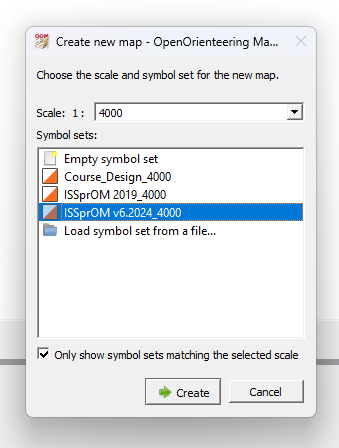
Create a new map in Mapper with scale 1:4000 and you should see this new option available to you: ISSprOM v6.2024_4000.
Custom symbol sets
Now that you know where the symbol set definitions live, you can take this further and create your own personal extended symbol set with all the official symbols, helper symbols and other custom symbols you might like.
The best idea is probably to build from an existing base symbol set, that is create a new map with an existing symbol set, leave the map blank, create your custom symbols in the symbols pane and then save the file as .omap/.xmap into the symbols set folder with a custom name like ISSprOM_lqmaps.xmap. I’ll dive deeper into that in another post.